> ## Documentation Index
> Fetch the complete documentation index at: https://injectivelabs-docs-ai-sdk.mintlify.site/llms.txt
> Use this file to discover all available pages before exploring further.
# 아카이벌 설정
이 가이드는 아카이벌 데이터를 제공하는 노드 플릿을 생성하고 게이트웨이를 사용하여 연결하는 과정을 안내합니다.
## 아키텍처
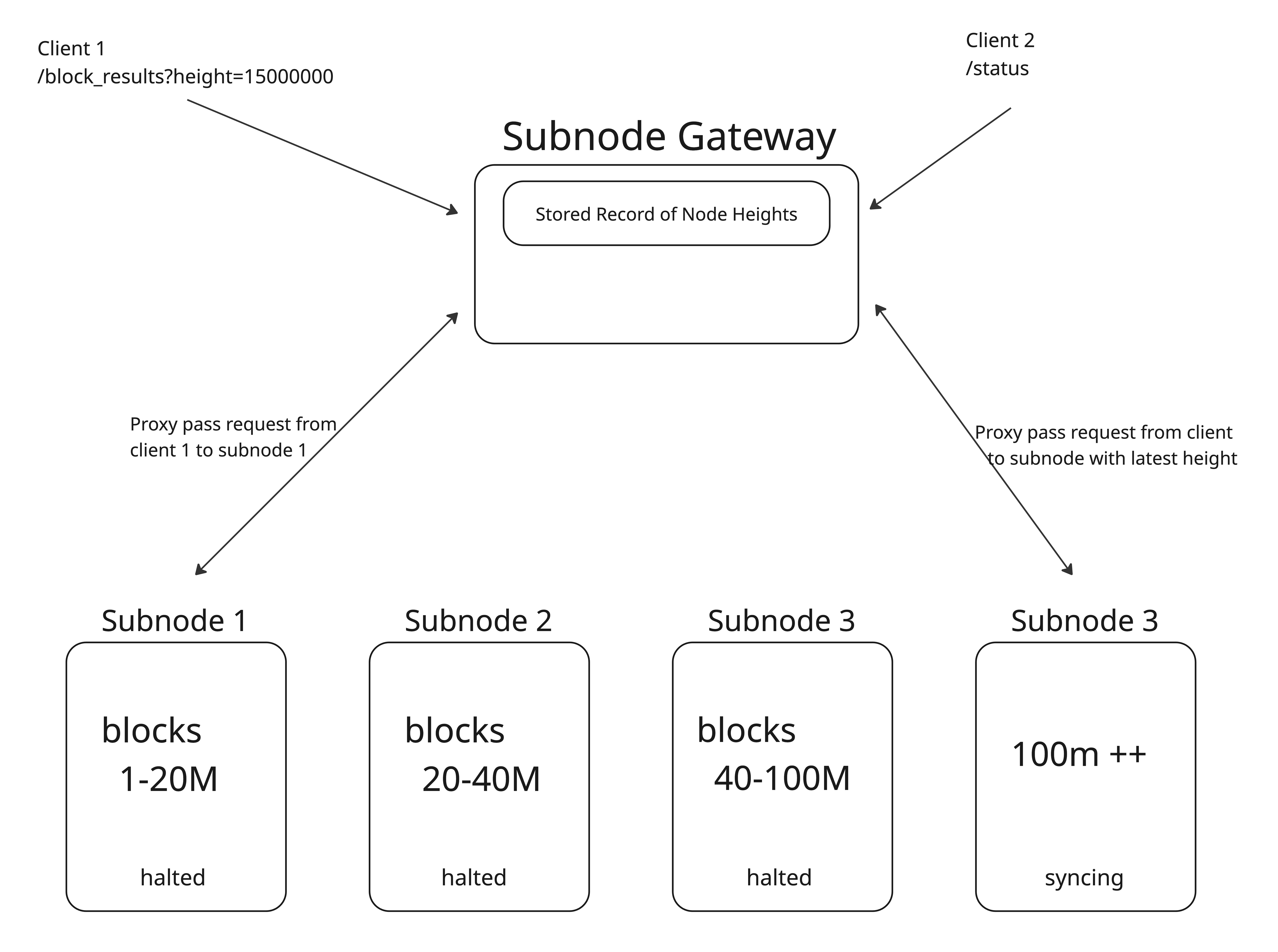
아카이벌 데이터 제공을 더 접근하기 쉽게 하기 위해 데이터를 더 작은 세그먼트로 분할합니다. 이러한 세그먼트는 `s3://injective-snapshots/mainnet/subnode`에 저장됩니다.
| Snapshot Dir | 높이 범위 | Injective 버전 | 권장 디스크 크기 |
| ------------ | ----------- | ------------ | --------- |
| `/0073` | 0 – 73M | v1.12.1 | 42 TiB |
| `/6068` | 60M – 68M | v1.12.1 | 7 TiB |
| `/7380` | 73M – 80M | v1.12.1 | 7 TiB |
| `/8088` | 80M – 88M | v1.13.3 | 7 TiB |
| `/8896` | 88M – 96M | v1.13.3 | 7 TiB |
| `/8898` | 88M – 98M | v1.13.3 | 7 TiB |
| `/98106` | 98M – 106M | v1.13.3 | 7 TiB |
| `/98107` | 98M – 107M | v1.14.0 | 7.5 TiB |
| `/66101` | 66M – 101M | v1.14.0 | 27 TiB |
| `/105116` | 105M – 116M | v1.15.0 | 7.5 TiB |
| `/113127` | 113M – 127M | v1.15.0 | 11 TiB |
| `/119143` | 119M – 143M | v1.17.0 | 16 TiB |
| `/138150` | 138M – 150M | v1.17.2 | 5.8 TiB |
이러한 세그먼트는 블록 범위에 따라 쿼리를 적절한 노드로 라우팅하는 애그리게이터 프록시인 게이트웨이를 통해 연결됩니다.
 ## 시스템 요구 사항
| 구성 요소 | 최소 사양 | 참고 |
| -------- | -------------------- | --------------------------------------- |
| **CPU** | AMD EPYC™ 9454P | 48 코어 / 96 스레드 |
| **메모리** | 128 GB DDR5 ECC | DDR5-5200 MHz 이상, 데이터 무결성을 위한 ECC |
| **스토리지** | 7 – 40 TB NVMe Gen 4 | PCIe 4.0 드라이브, 단일 드라이브 또는 RAID-0 어레이 가능 |
## 설정 단계
### 아카이벌 세그먼트를 호스팅하는 각 노드에서:
#### 1. 아카이벌 세그먼트 다운로드:
```bash theme={null}
aws s3 cp --recursive s3://injective-snapshots/mainnet/subnode/ $INJ_HOME
```
#### 2. 적절한 injective 바이너리 다운로드
#### 3. config 폴더 생성:
```bash theme={null}
injectived init $MONIKER --chain-id injective-1 --home $INJ_HOME --overwrite
```
#### 4. 프루닝 비활성화 및 p2p 차단:
```bash theme={null}
sed -i 's/^pruning *= *.*/pruning = "nothing"/' $INJ_HOME/config/app.toml
sed -i 's/^log_level *= *.*/log_level = "error"/' $INJ_HOME/config/app.toml
```
#### 5. 노드 실행:
```bash theme={null}
injectived start --home $INJ_HOME
```
### 게이트웨이 구성
```bash theme={null}
git clone https://github.com/decentrio/gateway
make build
```
구성 파일 예시:
```yaml theme={null}
upstream:
- rpc: "http://$NODE1:$RPC_PORT"
grpc: "$NODE1:$GRPC_PORT"
api: "http://$NODE1:$API_PORT"
blocks: [0,80000000]
ports:
rpc: $RPC_PORT
api: $API_PORT
grpc: $GRPC_PORT
jsonrpc: 0
jsonrpc_ws: 0
```
```bash theme={null}
gateway start --config $CONFIG_FILE
```
## 시스템 요구 사항
| 구성 요소 | 최소 사양 | 참고 |
| -------- | -------------------- | --------------------------------------- |
| **CPU** | AMD EPYC™ 9454P | 48 코어 / 96 스레드 |
| **메모리** | 128 GB DDR5 ECC | DDR5-5200 MHz 이상, 데이터 무결성을 위한 ECC |
| **스토리지** | 7 – 40 TB NVMe Gen 4 | PCIe 4.0 드라이브, 단일 드라이브 또는 RAID-0 어레이 가능 |
## 설정 단계
### 아카이벌 세그먼트를 호스팅하는 각 노드에서:
#### 1. 아카이벌 세그먼트 다운로드:
```bash theme={null}
aws s3 cp --recursive s3://injective-snapshots/mainnet/subnode/ $INJ_HOME
```
#### 2. 적절한 injective 바이너리 다운로드
#### 3. config 폴더 생성:
```bash theme={null}
injectived init $MONIKER --chain-id injective-1 --home $INJ_HOME --overwrite
```
#### 4. 프루닝 비활성화 및 p2p 차단:
```bash theme={null}
sed -i 's/^pruning *= *.*/pruning = "nothing"/' $INJ_HOME/config/app.toml
sed -i 's/^log_level *= *.*/log_level = "error"/' $INJ_HOME/config/app.toml
```
#### 5. 노드 실행:
```bash theme={null}
injectived start --home $INJ_HOME
```
### 게이트웨이 구성
```bash theme={null}
git clone https://github.com/decentrio/gateway
make build
```
구성 파일 예시:
```yaml theme={null}
upstream:
- rpc: "http://$NODE1:$RPC_PORT"
grpc: "$NODE1:$GRPC_PORT"
api: "http://$NODE1:$API_PORT"
blocks: [0,80000000]
ports:
rpc: $RPC_PORT
api: $API_PORT
grpc: $GRPC_PORT
jsonrpc: 0
jsonrpc_ws: 0
```
```bash theme={null}
gateway start --config $CONFIG_FILE
```